Context
An object (possibly, more than one) is interested to get notified when a change happens to another object. That is, some objects want to ‘observe’ another object.
Consider this scenario from the a student management system where the user is adding a new student to the system.
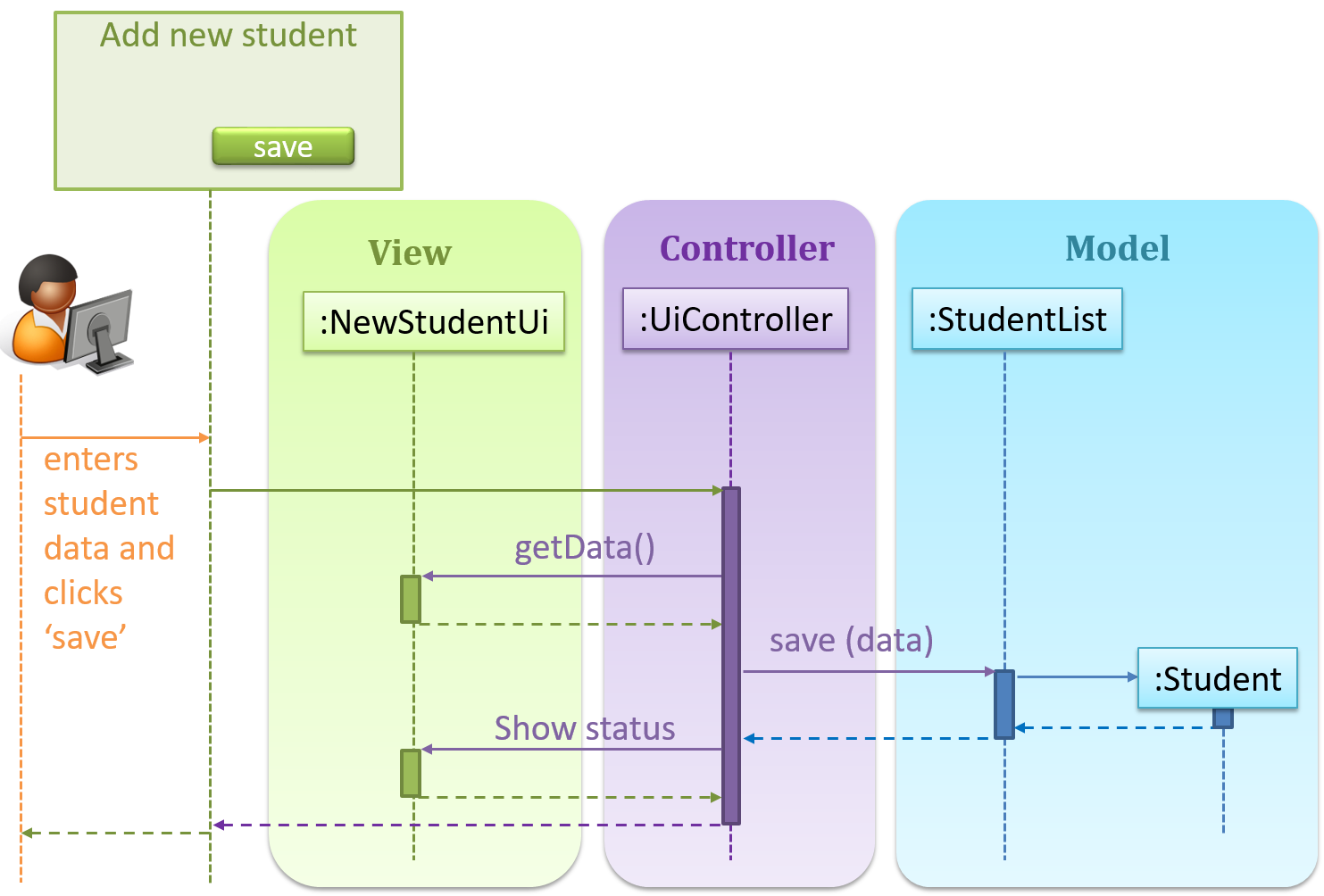
Now, assume the system has two additional views used in parallel by different users:
StudentListUi: that accesses a list of students andStudentStatsUi: that generates statistics of current students.
When a student is added to the database using NewStudentUi shown above, both StudentListUi and StudentStatsUi should get updated automatically, as shown below.
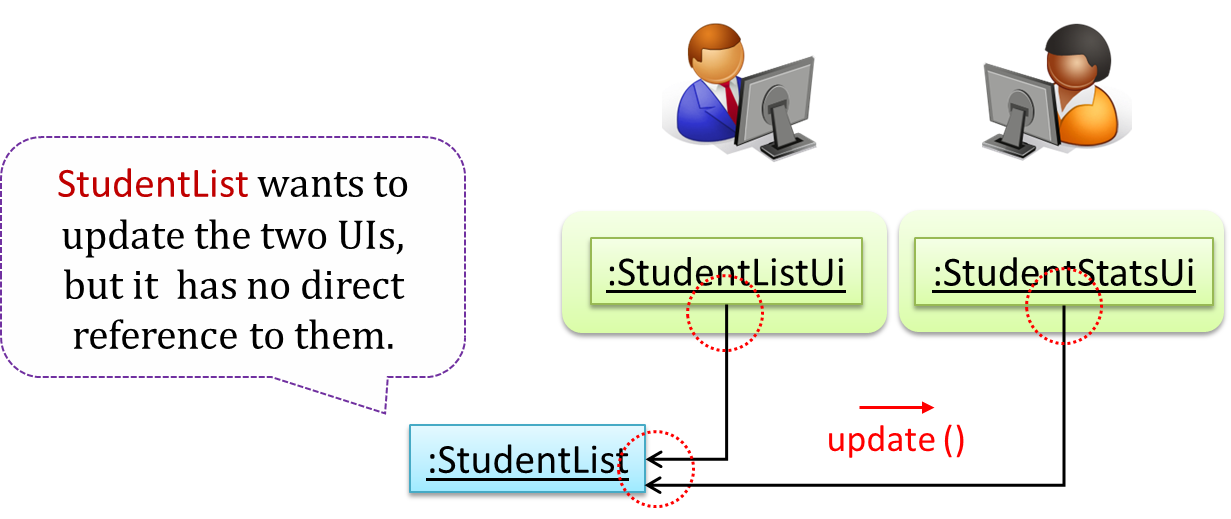
However, the StudentList object has no knowledge about StudentListUi and StudentStatsUi (note the direction of the navigability) and has no way to inform those objects. This is an example of the type of problem addressed by the Observer pattern.
Problem
The ‘observed’ object does not want to be coupled to objects that are ‘observing’ it.
Solution
Force the communication through an interface known to both parties.
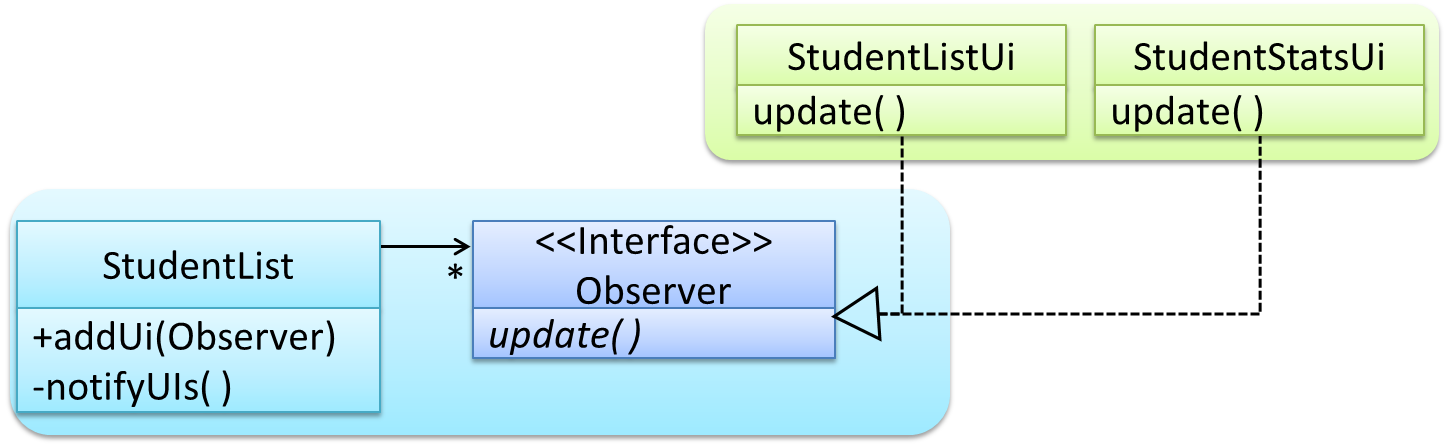
Here is the Observer pattern applied to the student management system.
During the initialization of the system,
-
First, create the relevant objects.
StudentList studentList = new StudentList();
StudentListUi listUi = new StudentListUi();
StudentStatusUi statusUi = new StudentStatsUi(); -
Next, the two UIs indicate to the
StudentListthat they are interested in being updated wheneverStudentListchanges. This is also known as ‘subscribing for updates’.studentList.addUi(listUi);
studentList.addUi(statusUi); -
Within the
addUioperation ofStudentList, all Observer objects subscribers are added to an internal data structure calledobserverList.//StudentList class
public void addUi(Observer o) {
observerList.add(o);
}
Now, whenever the data in StudentList changes (e.g. when a new student is added to the StudentList),
-
All interested observers are updated by calling the
notifyUIsoperation.//StudentList class
public void notifyUIs() {
//for each observer in the list
for(Observer o: observerList){
o.update();
}
} -
UIs can then pull data from the
StudentListwhenever theupdateoperation is called.//StudentListUI class
public void update() {
//refresh UI by pulling data from StudentList
}Note that
StudentListis unaware of the exact nature of the two UIs but still manages to communicate with them via an intermediary.
Here is the generic description of the observer pattern:

<<Observer>>is an interface: any class that implements it can observe an<<Observable>>. Any number of<<Observer>>objects can observe (i.e. listen to changes of) the<<Observable>>object.- The
<<Observable>>maintains a list of<<Observer>>objects.addObserver(Observer)operation adds a new<<Observer>>to the list of<<Observer>>'s. - Whenever there is a change in the
<<Observable>>, thenotifyObservers()operation is called that will call theupdate()operation of all<<Observer>>'s in the list.
In a GUI application, how is the Controller notified when the “save” button is clicked? UI frameworks such as JavaFX has inbuilt support for the Observer pattern.
Exercises
polymorphism and Observer pattern.
Explain how polymorphism is used in the Observer pattern.

With respect to the general form of the Observer pattern given above, when the Observable object invokes the notifyObservers() method, it is treating all ConcreteObserver objects as a general type called Observer and calling the update() method of each of them. However, the update() method of each ConcreteObserver could potentially show different behavior based on its actual type. That is, update() method shows polymorphic behavior.
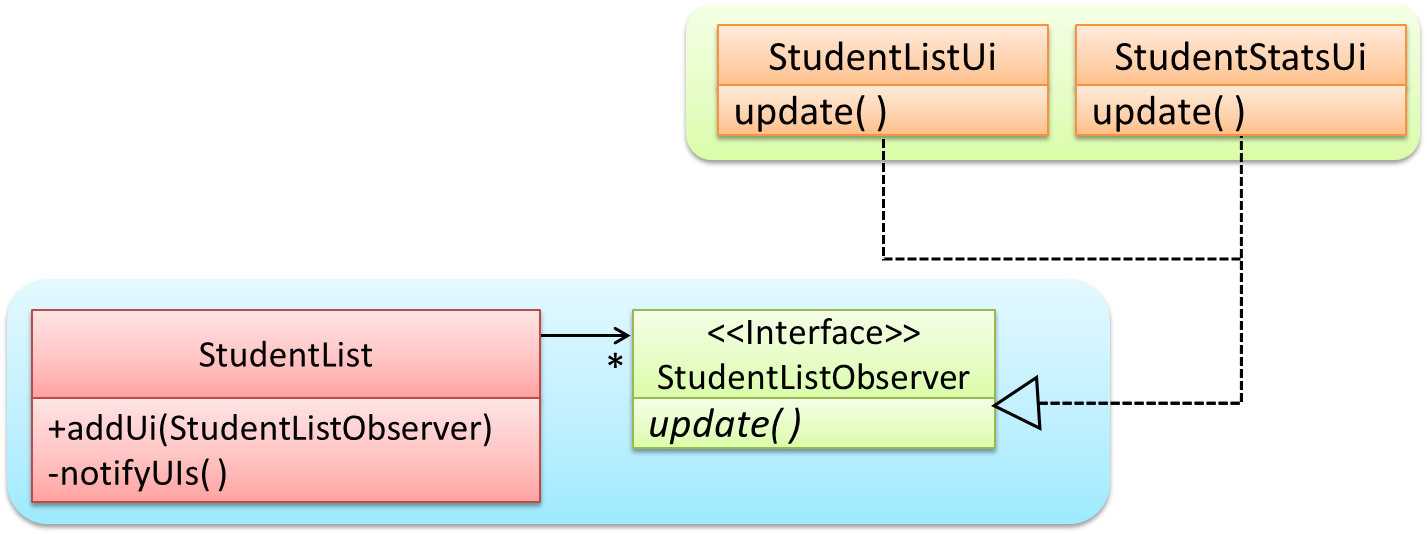
In the example given below, the notifyUIs operation can result in StudentListUi and StudentStatsUi changing their views in two different ways.
Observer patter usage
The Observer pattern can be used when we want one object to initiate an activity in another object without having a direct dependency from the first object to the second object.
True
Explanation: Yes. For example, when applying the Observer pattern to an MVC structure, Views can get notified and update themselves about a change to the Model without the Model having to depend on the Views.